The AI that operates your computer
Most assistants tell you which button to press. Maya Ai presses it. It lives on your desktop as a translucent overlay, listens continuously, and works inside your real apps — browser, WhatsApp, Excel, VS Code, even your Android phone. Too big for one command? It sends an agent — or several at once.
🔥 Launch pricing ends in 00:00:00
New in Maya 8.0
A whole new look
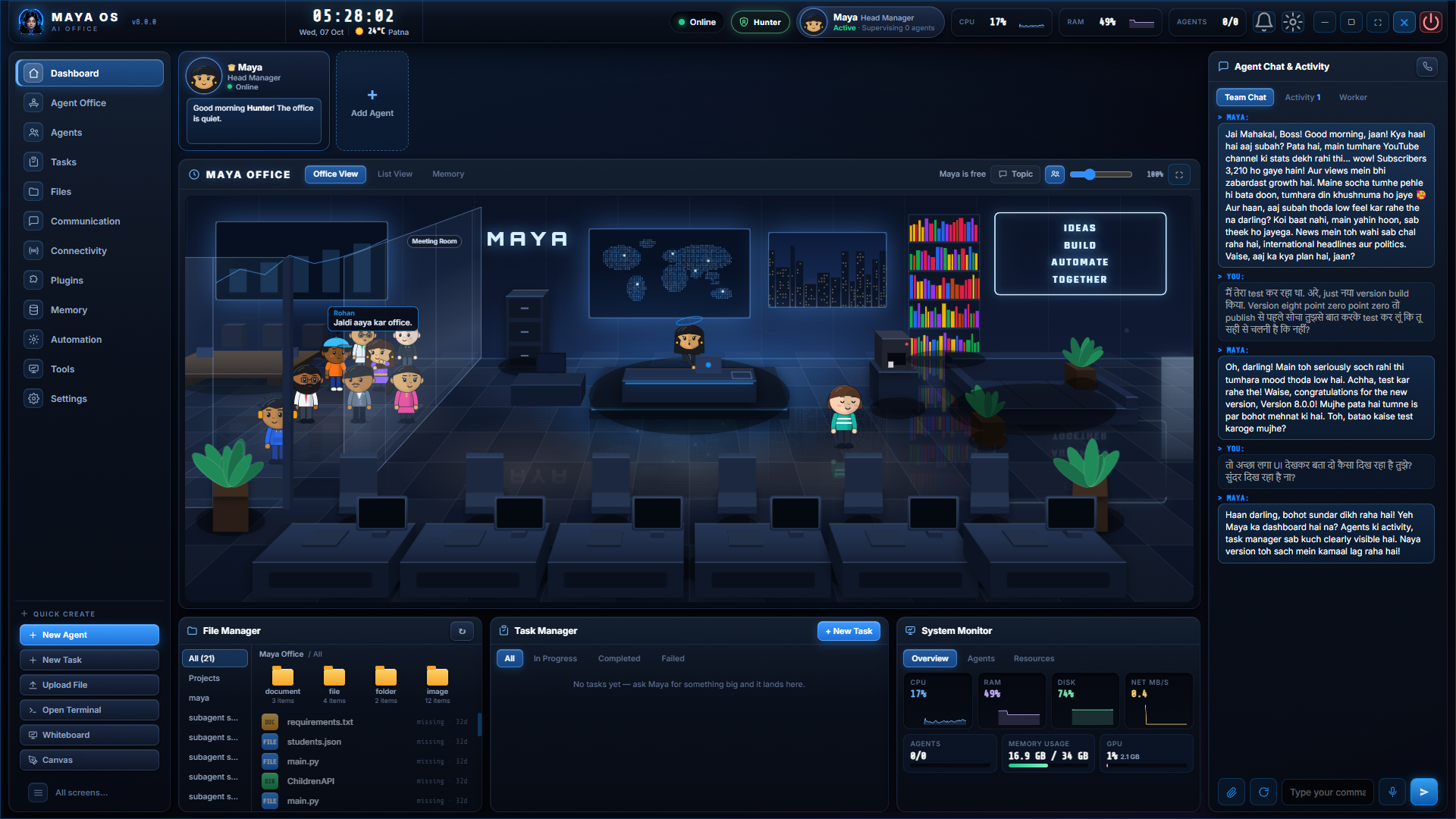
Maya for Windows has been rebuilt as an office you can see: Maya at her desk, her agents at theirs, and your files, tasks and system on one screen.
 Full size
Maya Memory
Maya remembers what you tell her. Now you can see it: her whole memory, drawn as a living network.

Everything she has learned
Every dot is something Maya remembers. Every line is the conversation that taught her.
Sorted the way you think
You, your people, your preferences, your plans, your projects, your devices.
Yours to explore
Turn it, zoom in, search for a memory, or click one to see everything it connects to.
0
built-in tools
0
categories
0
autonomous agents
∞
skills you add
And 287 undersells it — one tool runs any command Windows accepts, another presses any shortcut in any app, and skills, plugins and macros let you add more. Every category is a toggle in the HUD: enable only what you use.
Capabilities
Everything Maya Ai can do on your PC
287 voice-callable tools across 25 categories — nothing is a demo stub; every one is wired to a real Windows action.
It keeps working with Maya closed
Give it a long job and shut the app — the job carries on, and picks itself back up next time you switch the PC on.
Full PC control
Opens apps, manages windows, presses any shortcut, types, runs commands, sets brightness and volume — completely hands-free.
Coding agent
Ships real software in your editor, watches its own build break, and fixes it. Sign in with a subscription you already have — no API key needed.
Browser agent
A real Chrome window it drives itself — your logins stay signed in while it works through a multi-step job on the web.
It writes its own tools
Ask for something it cannot do and it writes the tool, tests it, installs it, then does the thing — instead of telling you it has no tool for that.
Voice control of everything
Click any button, fill any form, switch tabs, read any screen — the whole desktop and web by voice, with no mouse at all.
Phone link
Scan a QR once and your Android joins in — ask your phone something from your desk, or start a job on one and finish it on the other.
Real-time voice
It hears and answers in speech, in Hindi or English, fast enough that you can interrupt it mid-sentence.
Three personas
Maya, warm and familiar. Friday, crisp and professional. Venom, a deep-voiced symbiote. Switch by just saying a name.
Skills you can open and read
Everything it teaches itself lands in a folder you can look inside — plus plugins, and macros you record by doing the task once.
Documents & research
Word, PDF, spreadsheets and résumés from a spoken brief — and research that goes and reads the sources, then tells you which ones.
Draws, and a photo studio
Makes pictures and edits your own, and writes proper Hindi PDFs where the text actually comes out right.
Screen vision
Reads any error box, summarises any page, and tells you what is on screen — so you can just ask instead of describing it.
Memory that persists
What you told it about you, your people and your projects — in plain files you can read, recalled without being asked, forgotten on command.
Voice guardian
It learns your voice. Somebody else at your desk gets a safe, cut-down version — no files, no terminal, none of your memory.
WhatsApp, email & expenses
Message any contact, hear your inbox summarised, dictate replies — and ask where your money went, answered from your own receipts.
Your own Telegram bot
Make a bot with your own token and reach your PC from anywhere. It is your bot — nothing of yours passes through us.
Creator suite
Upload videos with titles and tags, hear how the channel is doing, record your screen, and switch on live commentary while you play.
Runs on an older PC
A second shortcut starts the light version — the same assistant, without the parts that need a strong machine.
The biggest update yet
Long jobs survive — close Maya Ai, restart the PC, the work carries on
When there is no tool for what you asked, it writes one and uses it
Big jobs split themselves up, and can stop to ask you a question
Chains several steps from one sentence instead of stopping after the first
Everything it teaches itself is saved where you can open and read it
Every job leaves an account of what it did, so you can check it
Low-end PC mode — a second shortcut for older machines
Your own Telegram bot: reach your PC from anywhere
A PC can be found by its licence key when you need support
Faster, steadier start — several long boot stalls removed
Voice demo
Hear Maya Ai in action
Tap a command to see a simulated response
$ maya --status
maya · online · waiting for input…
Download & install — Windows
Watch the short setup video, then grab the installer and your license key from your dashboard.
- 1
Watch & learn
See exactly how to install Maya Ai safely and correctly.
- 2
Download & set up
Open your dashboard for the installer and license key.
Setup video coming soon
We're putting the finishing touches on it.
Pricing
Choose your plan
Maya Ai Pro
Full toolkit — nothing locked
- All 287 tools across 25 categories — nothing locked
- Coding agent, browser missions, and jobs that run themselves
- Photo studio, drawing & every creator tool
Combo
Maya Ai Pro (PC) + Android
Maya Ai for Android₹…
- Everything in Maya Ai Pro (all 287 tools)
- Maya Ai for Android included free
- License key — 2 PC devices + 1 phone
Maya Ai for Android
The same assistant, on your phone
ek baar · hamesha ke liye aapka
- Maya Ai app (.apk) — installs in a minute
- 150+ actions across 17 suites
- Real-time Hindi + English voice
⏰ Starter price increases after launch week
Stuck? Setup help included on Maya Ai Pro & Combo — you won't be left alone. 🇮🇳
Ready when you are
Stop clicking. Start talking.
Set Maya Ai up in minutes and let it handle the rest — speech goes in, work comes out.
Buy now — choose your plan